
PB Art Academy Management Platform
A bespoke management platform built to digitise every part of running an art academy — enrolment, attendance, performance, fees and staff — into one role-protected system.
A growing art academy, outgrowing spreadsheets.
PB Art Academy runs structured art education across multiple disciplines — sketching, watercolour, oil painting, acrylic painting, figure drawing and digital art — organised into levels and weekly batches, with a roster of instructors each responsible for their own students.
As the academy scaled to nearly 200 active students across multiple weekly batches and six instructors, the operational load — admissions, attendance, fee collection, instructor coordination and progress tracking — outgrew what paper registers and spreadsheets could reliably hold.
The brief was to replace every one of those manual workflows with a single, role-protected platform: one system every staff member logs into, sees only what their role permits, and where the owner can see the whole business — students, money and performance — in one place.
Before: a business run on paper and memory.
Every one of these was a real operational gap the platform needed to close.
Paper attendance
Daily attendance recorded on paper per batch, with no easy way to see patterns or absentee trends across the academy.
Manual fee tracking
Fee collection, dues and discounts tracked by hand — reconciling who had paid, and who hadn't, was slow and error-prone.
No centralized records
Student details, guardian contacts and enrolment history scattered across registers and spreadsheets instead of one source of truth.
No performance tracking
No structured way to track each student's progress through the syllabus, art by art, level by level.
Staff coordination
No shared system for assigning students to instructors, or seeing who reviewed what, and when.
Manual communication
Birthday wishes and fee reminders sent one by one, with no templates and no record of what was sent.
No analytics
No visibility into growth, retention or attendance trends without manually tallying registers by hand.
No financial reporting
Income, expenses and cash position lived in disconnected notebooks with no single ledger view.
After: one platform, eight modules, zero paper.
Every challenge above maps to a purpose-built module — each one scoped to exactly the role that needs it.
Dashboard & Analytics
KPI tiles, trend charts and drill-down reports for the Owner and Manager roles, updated in real time.
Student Management
Full CRUD student records with batch and category assignment, photo capture and active/inactive status.
Finance
Fee collection, discounts, expense recording and a live ledger — replacing every manual cash register.
Attendance
Daily digital attendance per batch, with date-range reports and summary stats.
Performance
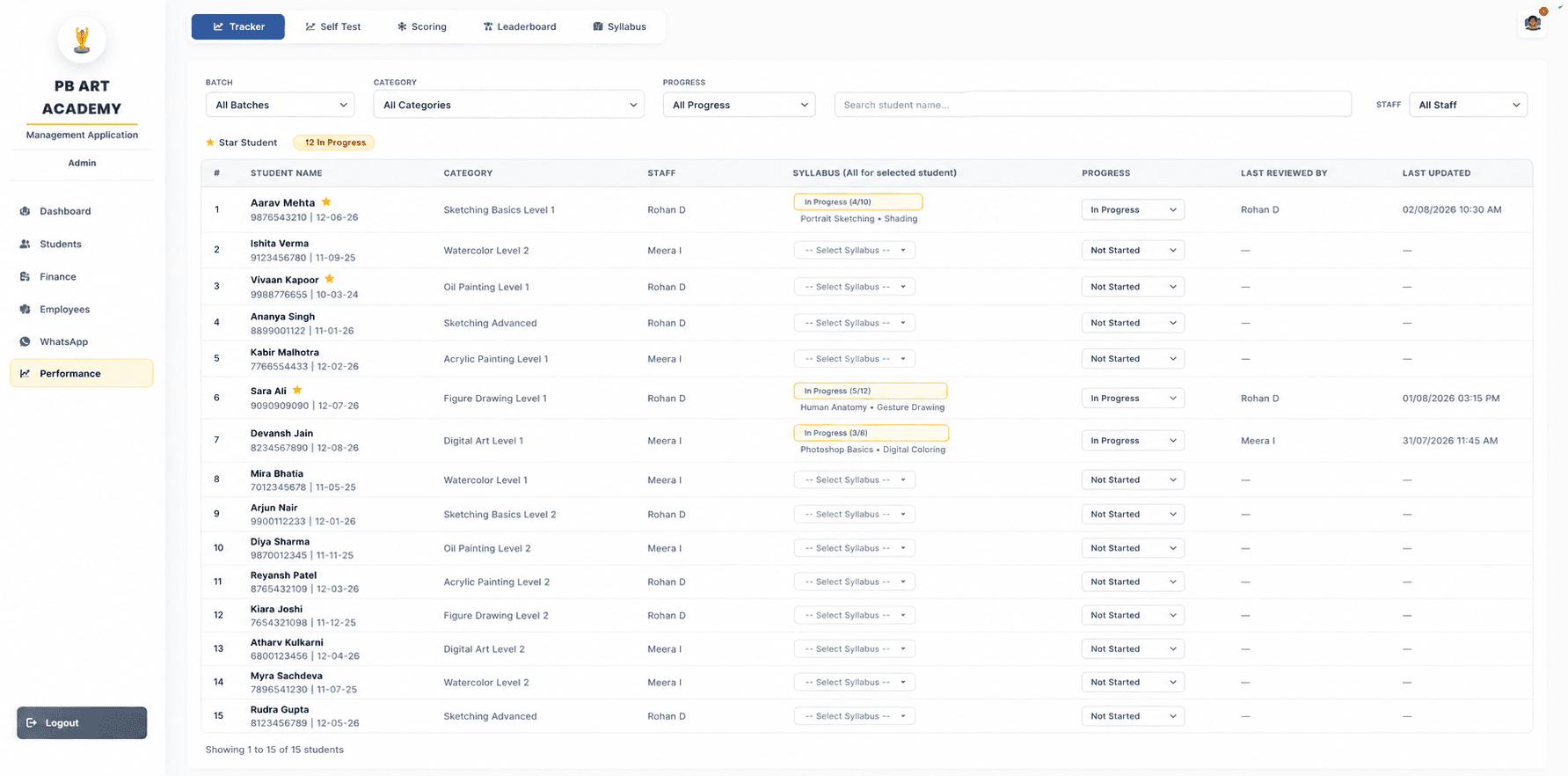
Art-by-art progress tracking, scoring, leaderboards and the syllabus reference, grouped in one tab set.
Employees
Staff records, attendance, salary calculation and staff-to-student assignment in one view.
Template-driven birthday wishes and fee reminders, triggered directly from student and staff records.
Audit Log
A complete, queryable trail of every write operation — user, role, action, entity, IP and timestamp.
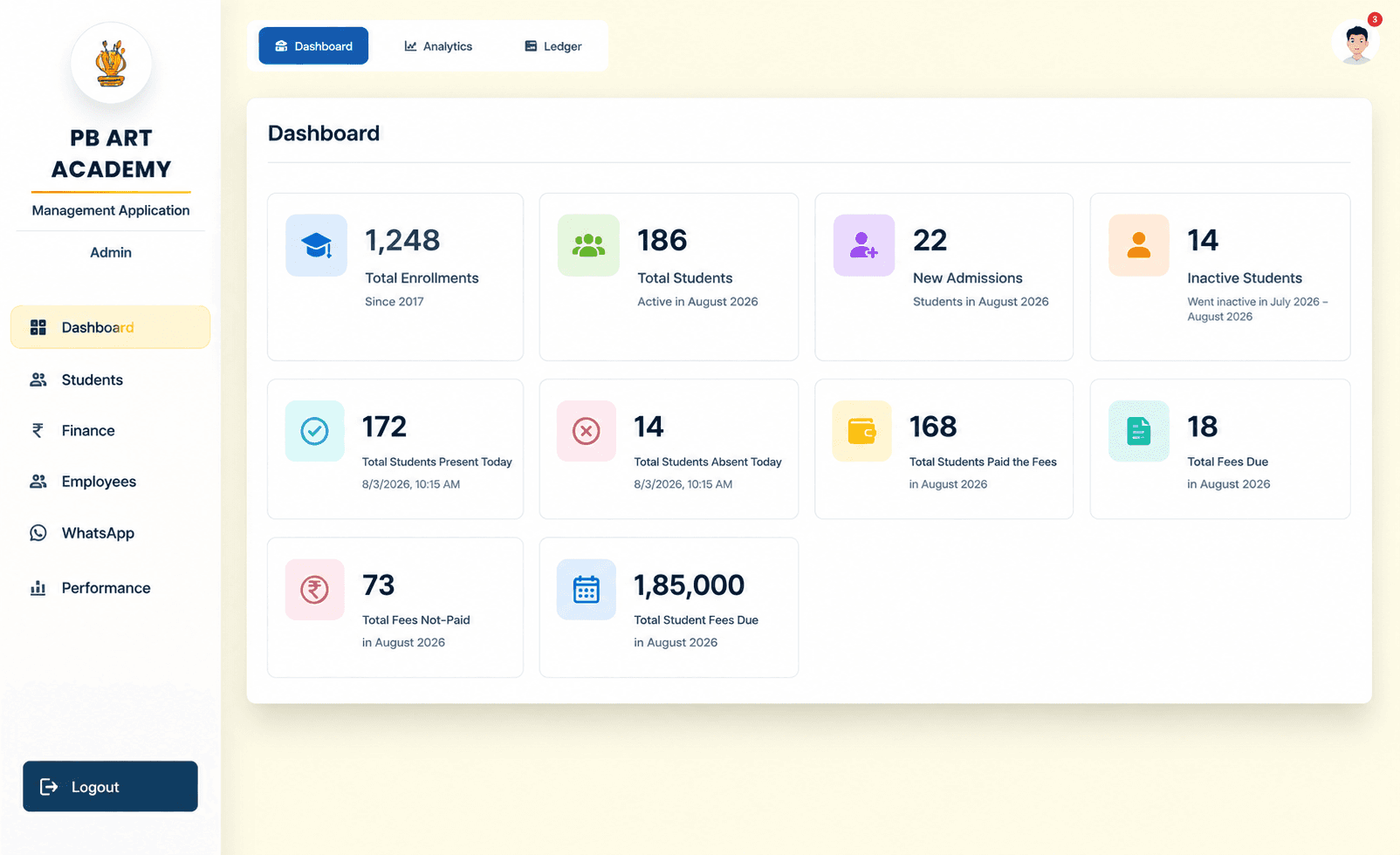
Every number the Owner needs, on one screen.
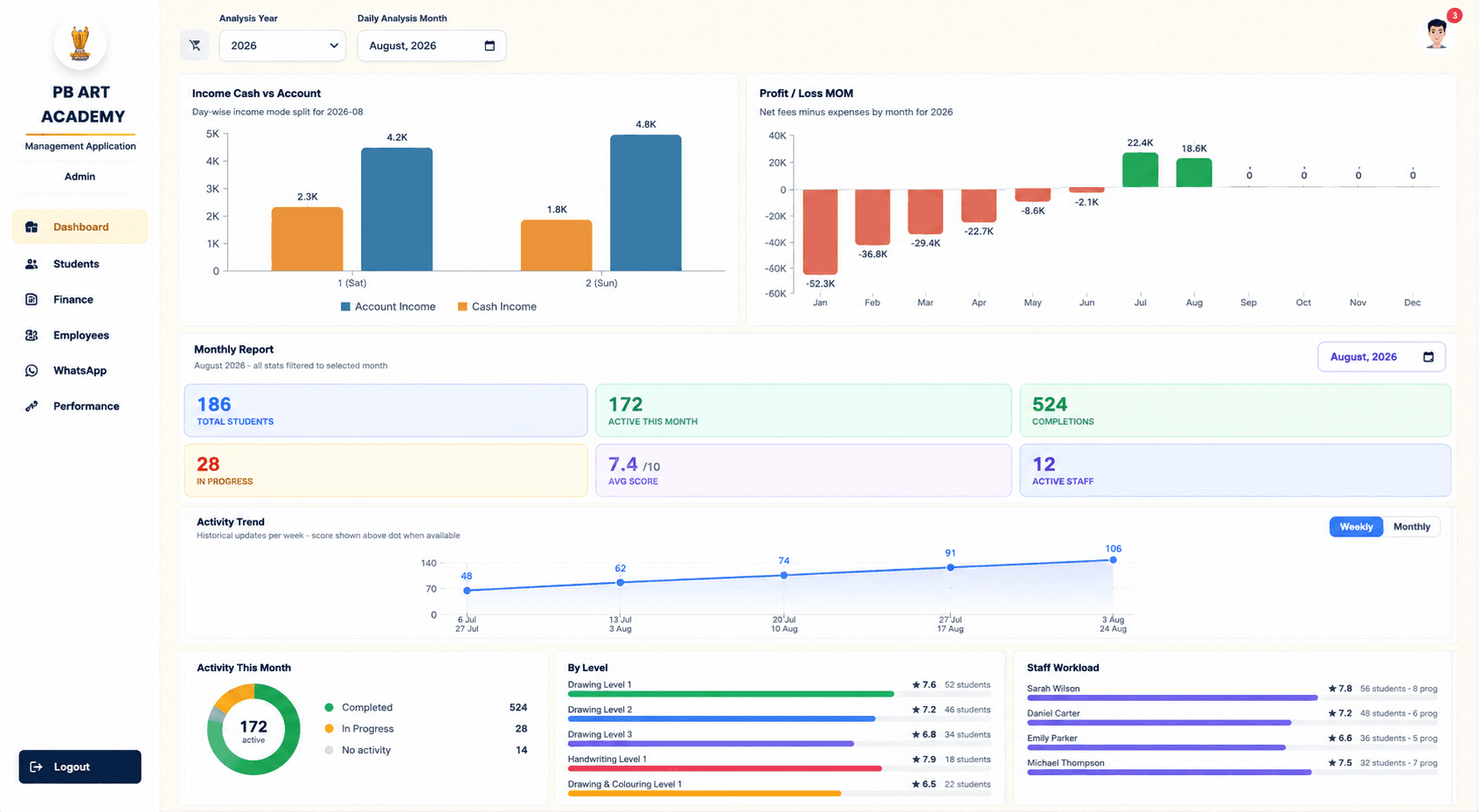
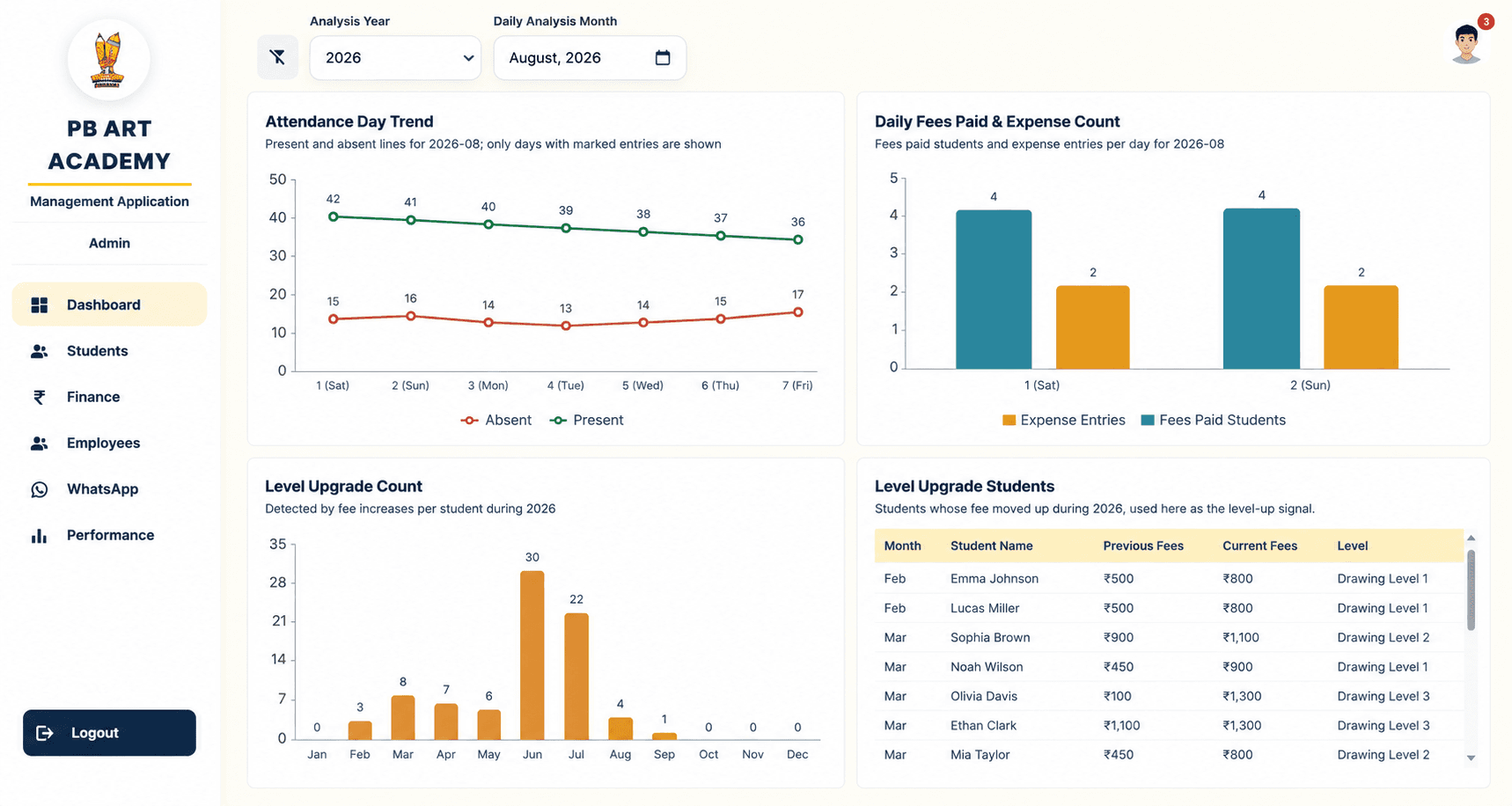
KPI tiles up top, trend charts underneath, and drill-down access into the record behind every figure.
KPI tiles
Enrolments, active students, admissions, attendance and fee status surfaced the moment the Owner logs in.
Trend charts
Month-on-month fees, expenses and profit/loss, plus weekly activity trend lines for engagement.
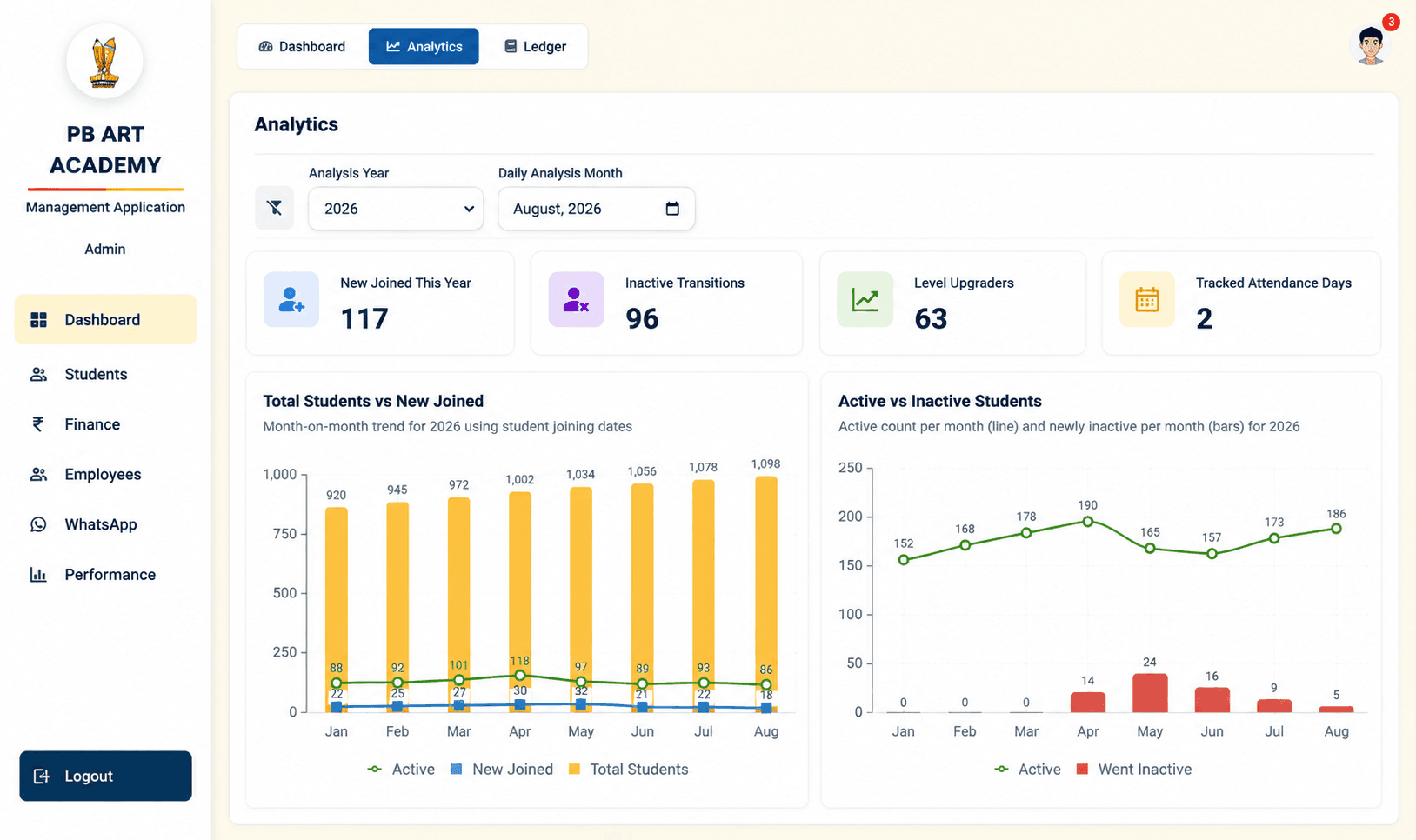
Student growth
New joins vs total students, and active-vs-inactive movement, tracked month by month for 2026.
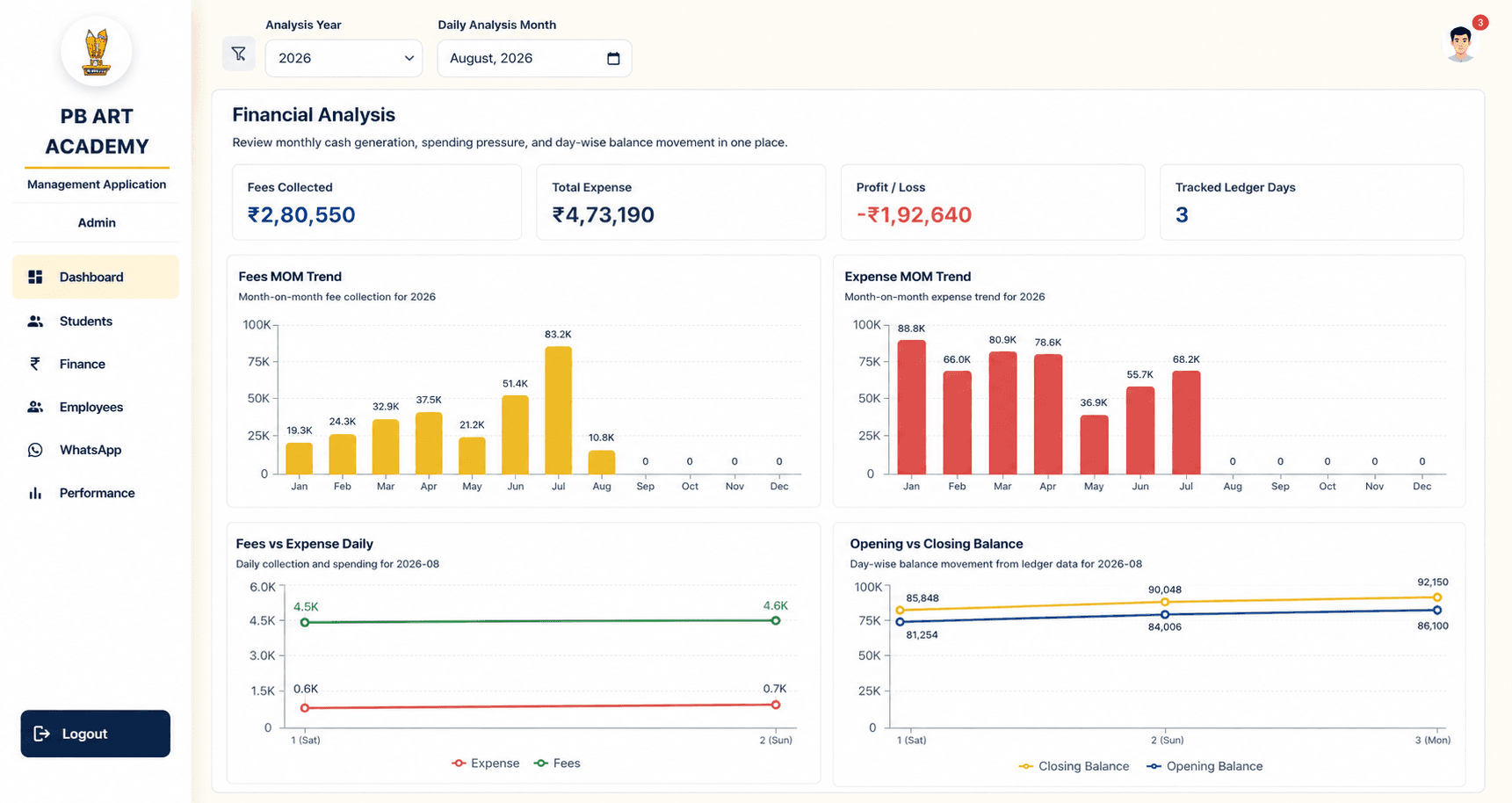
Financial trends
Cash vs account income split, opening/closing balance movement and fees-vs-expense daily view.
Attendance trends
Day-wise present/absent lines alongside fees-paid and expense-entry counts for the same period.
Drill-down reports
Every chart links back to the underlying student, staff or transaction record for verification.
From walk-in to enrolled, in one form.
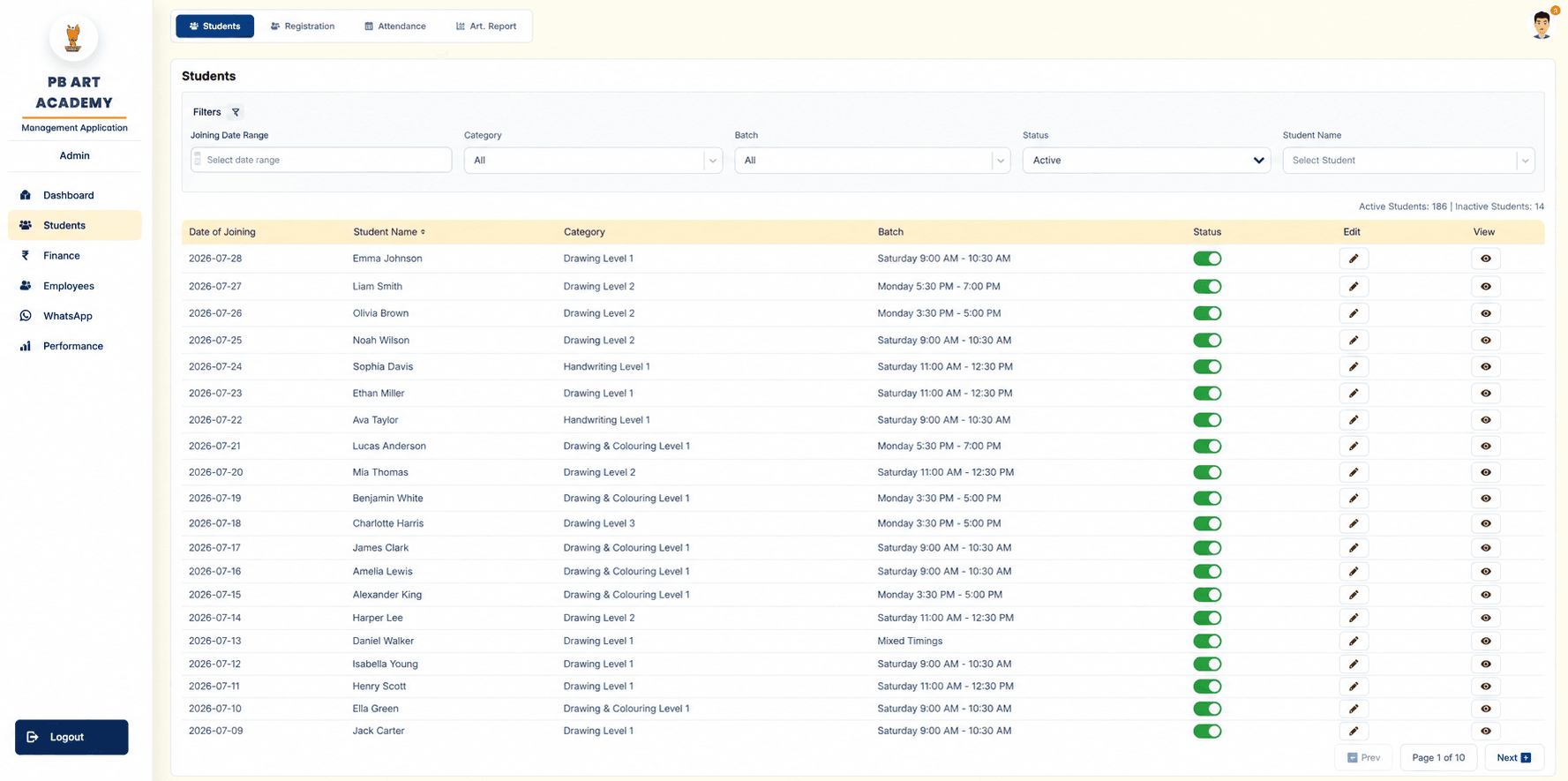
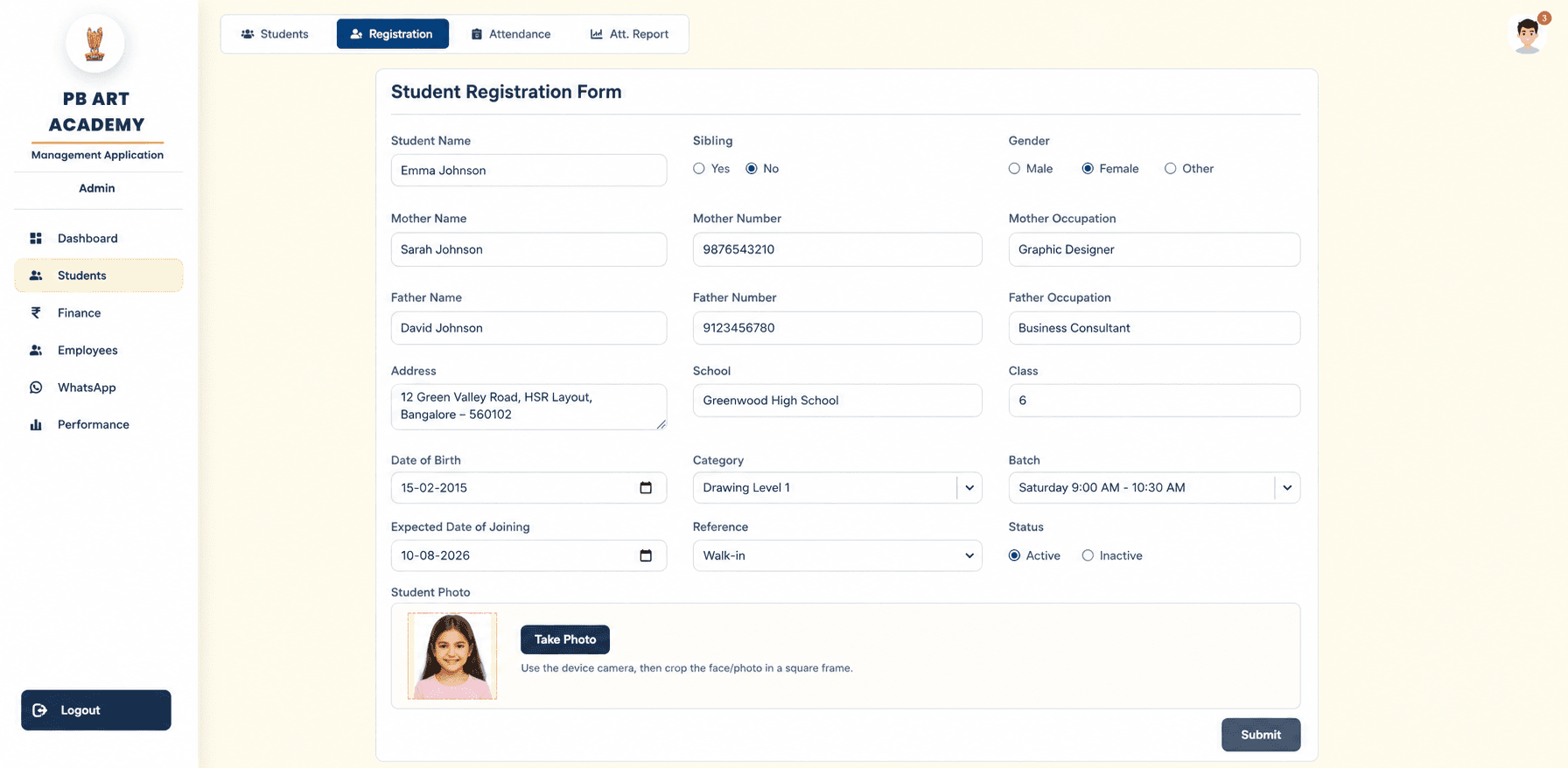
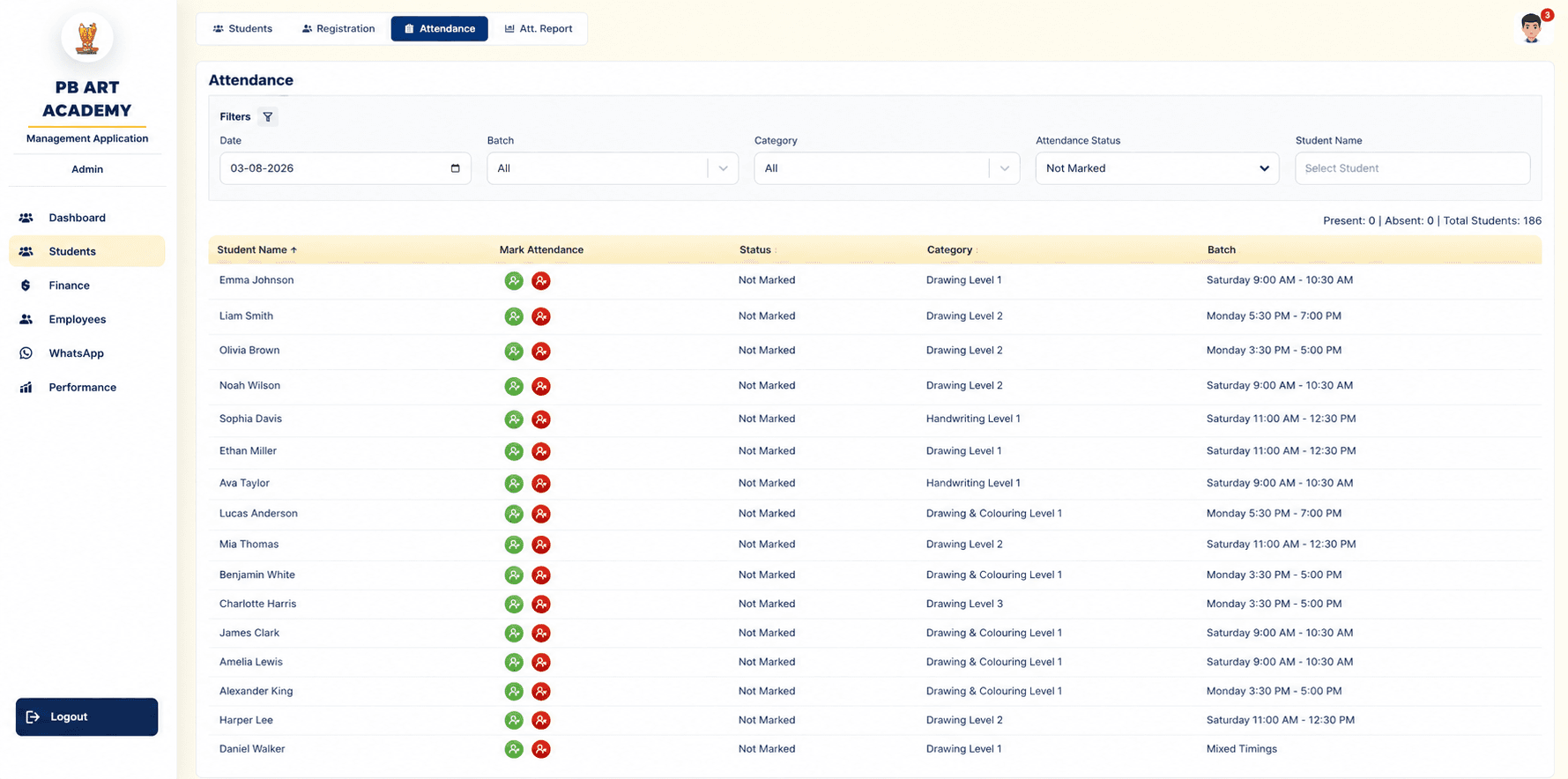
Registration, batch assignment, daily attendance and monthly reporting — all built around the same student record.
Registration workflow
One structured form captures the student, both guardians, school, batch, category and expected joining date.
Photo capture
Camera-based photo upload attached directly to the student record during registration.
Batch & category management
Students are assigned to a weekly batch and a skill category/level, both filterable across every list and report.
Filtering
Joining-date range, category, batch, status and name filters on every student-facing table.
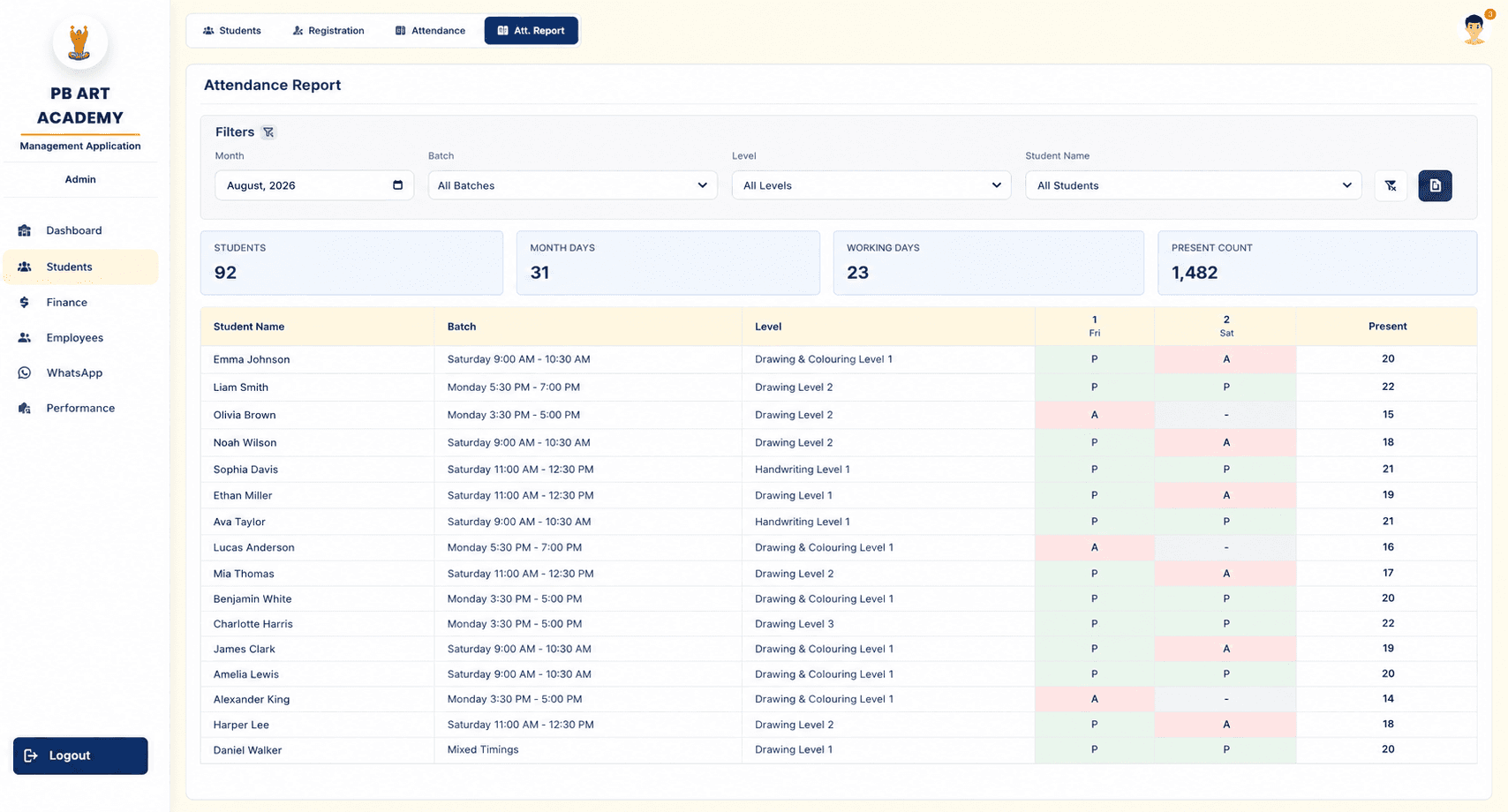
Attendance & reports
Daily marking plus a monthly report with per-day present/absent grids and summary tiles.
A single ledger the Owner actually trusts.
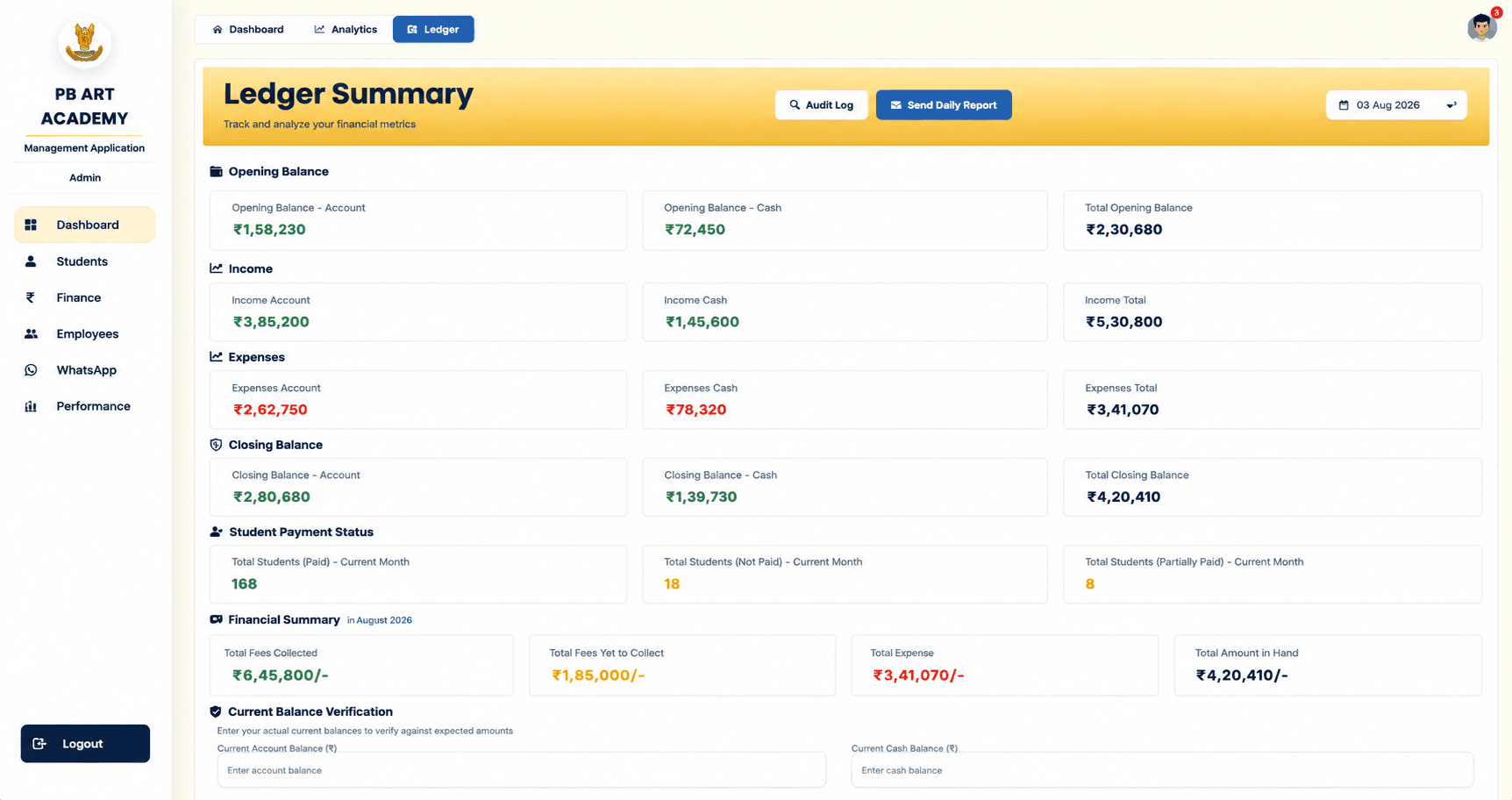
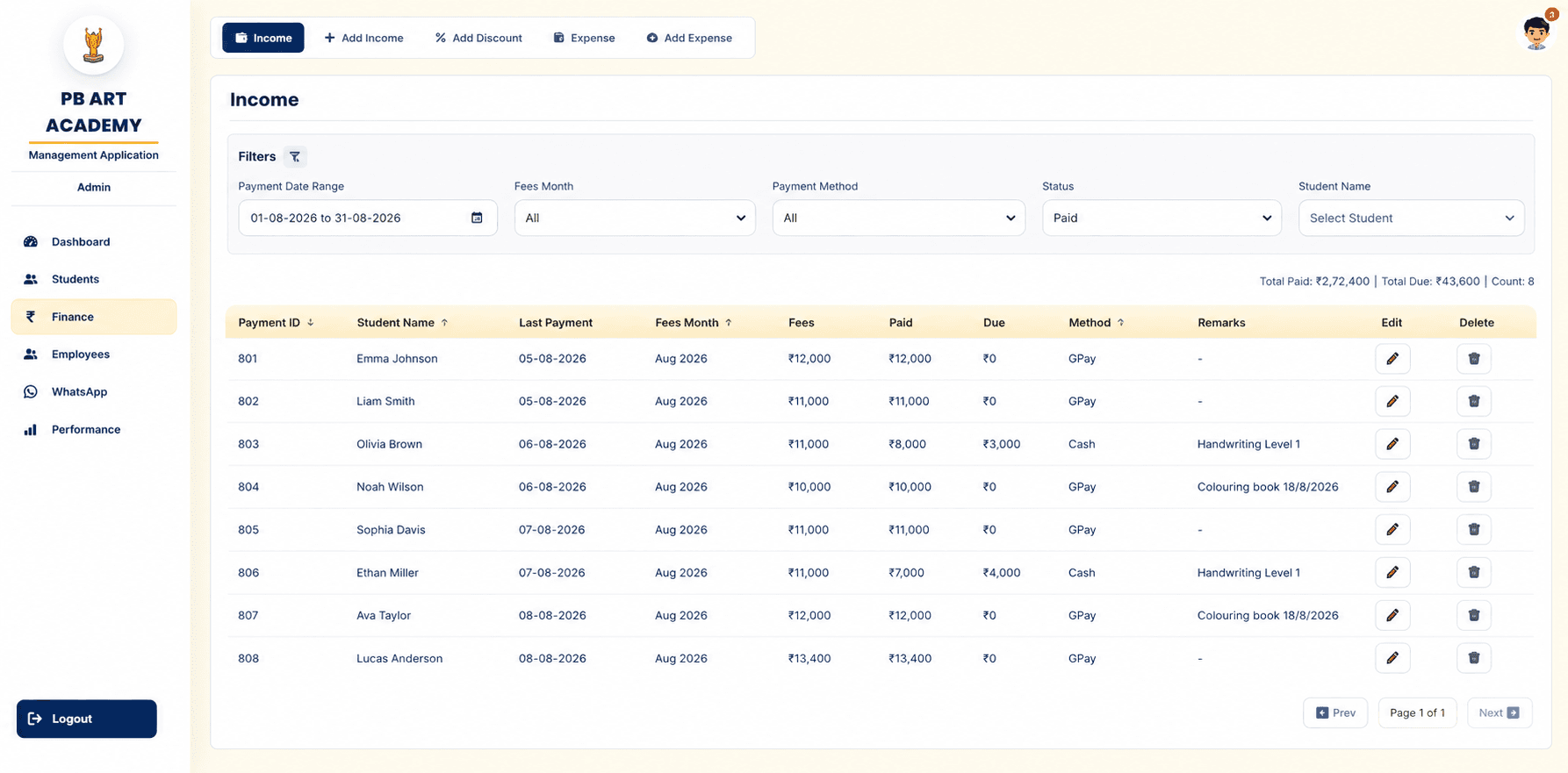
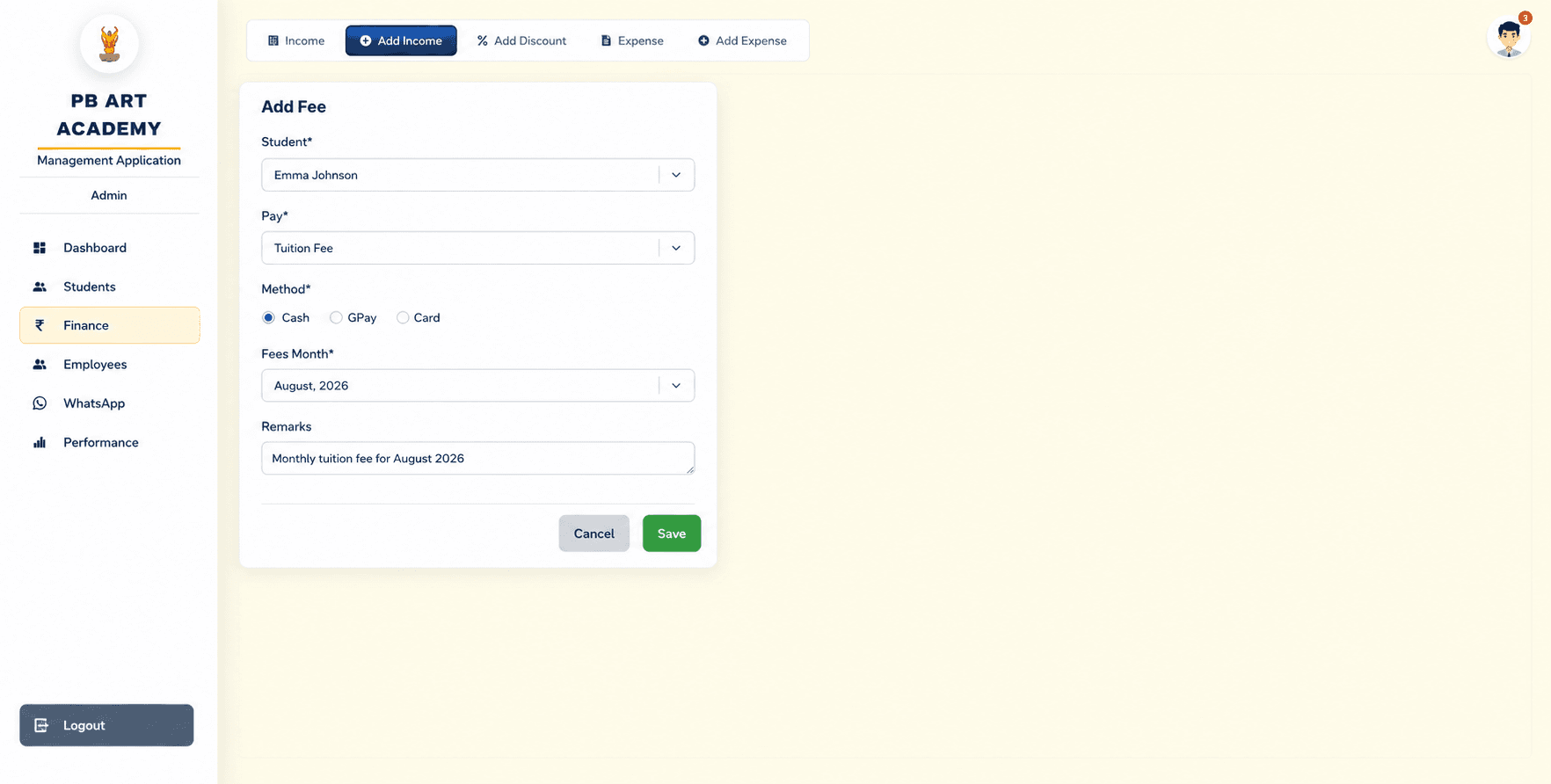
Fee collection, discounts and expenses all resolve into one live ledger — the exact figures below are pulled straight from the August 2026 ledger.
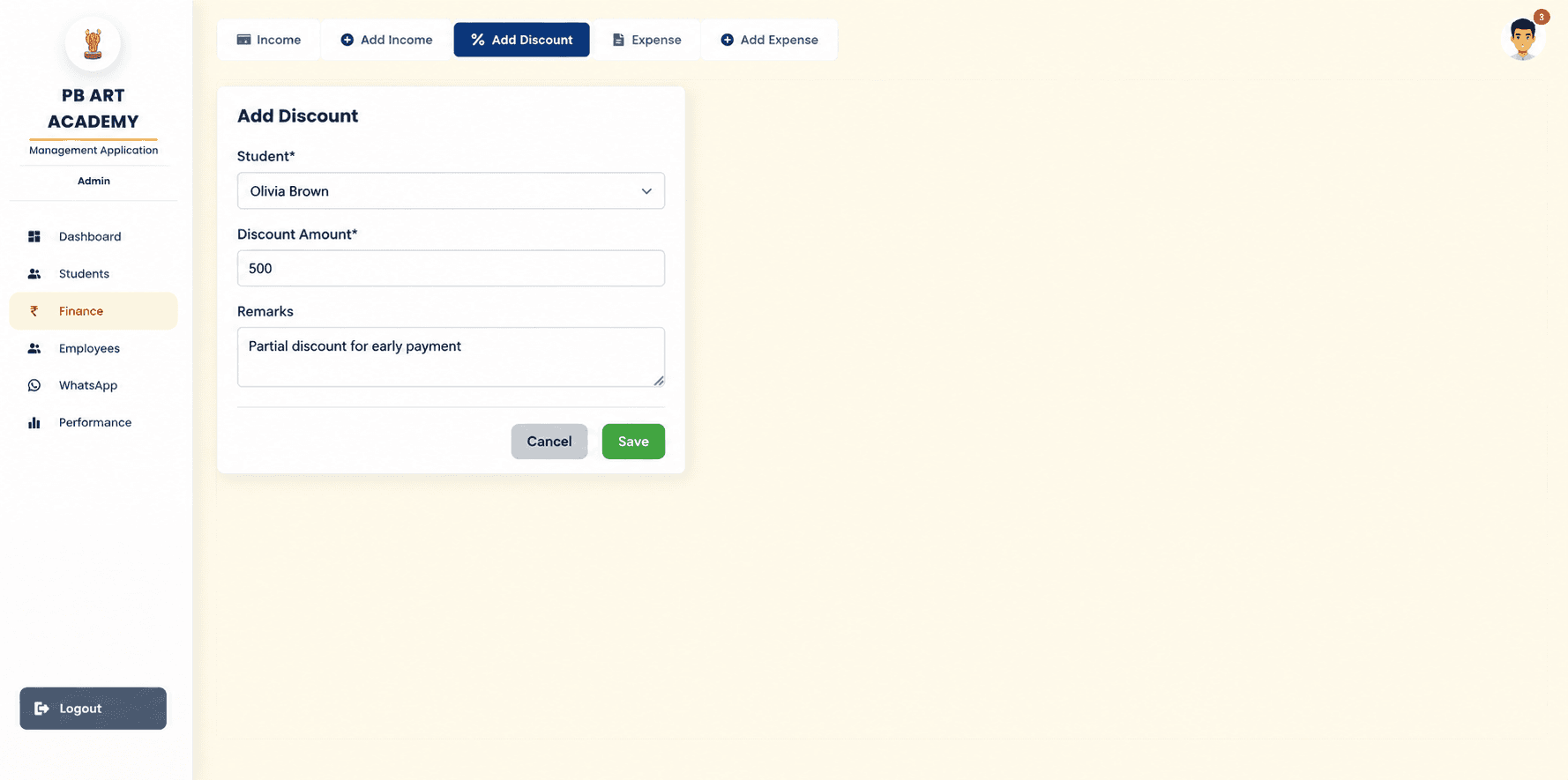
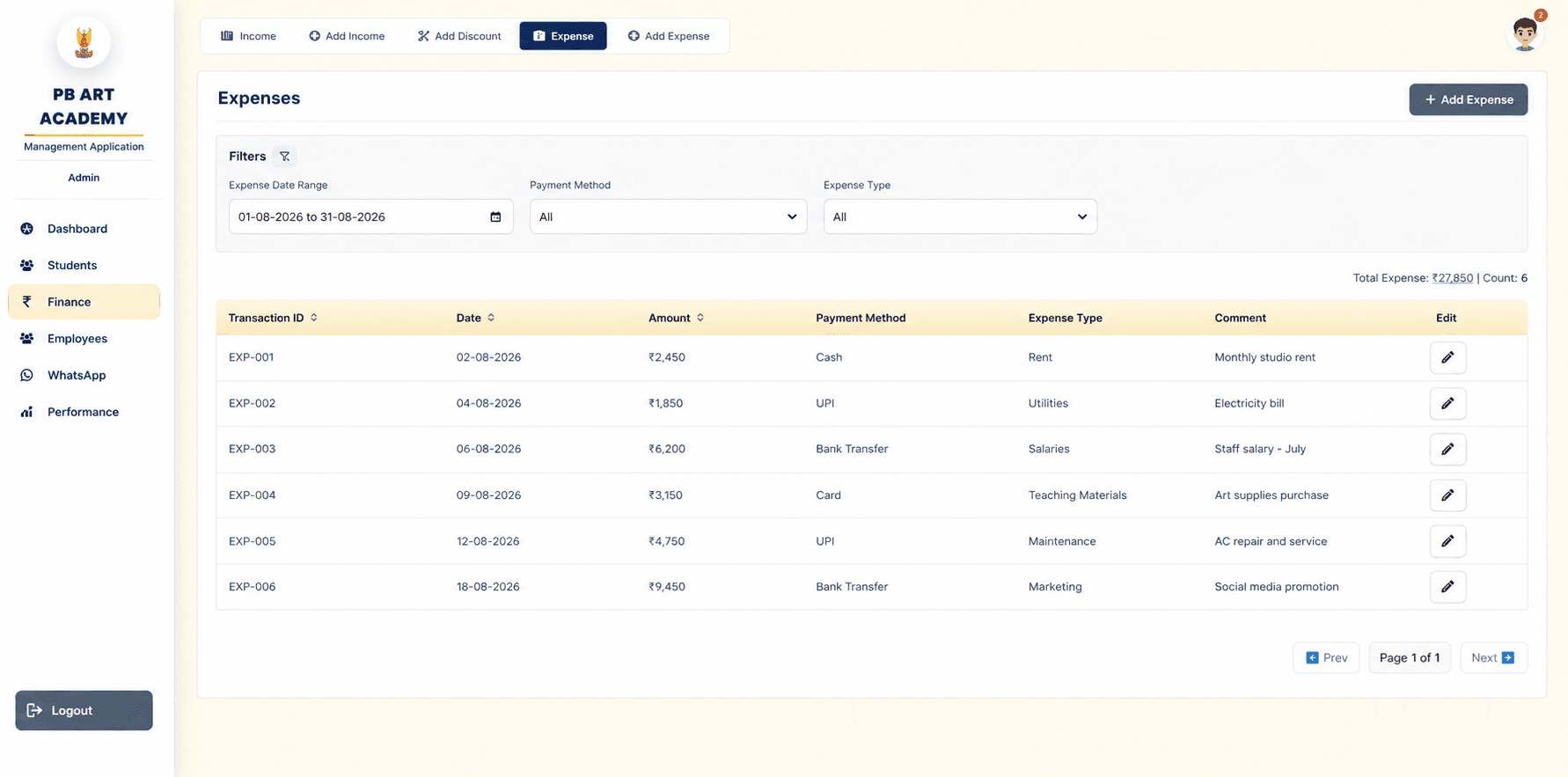
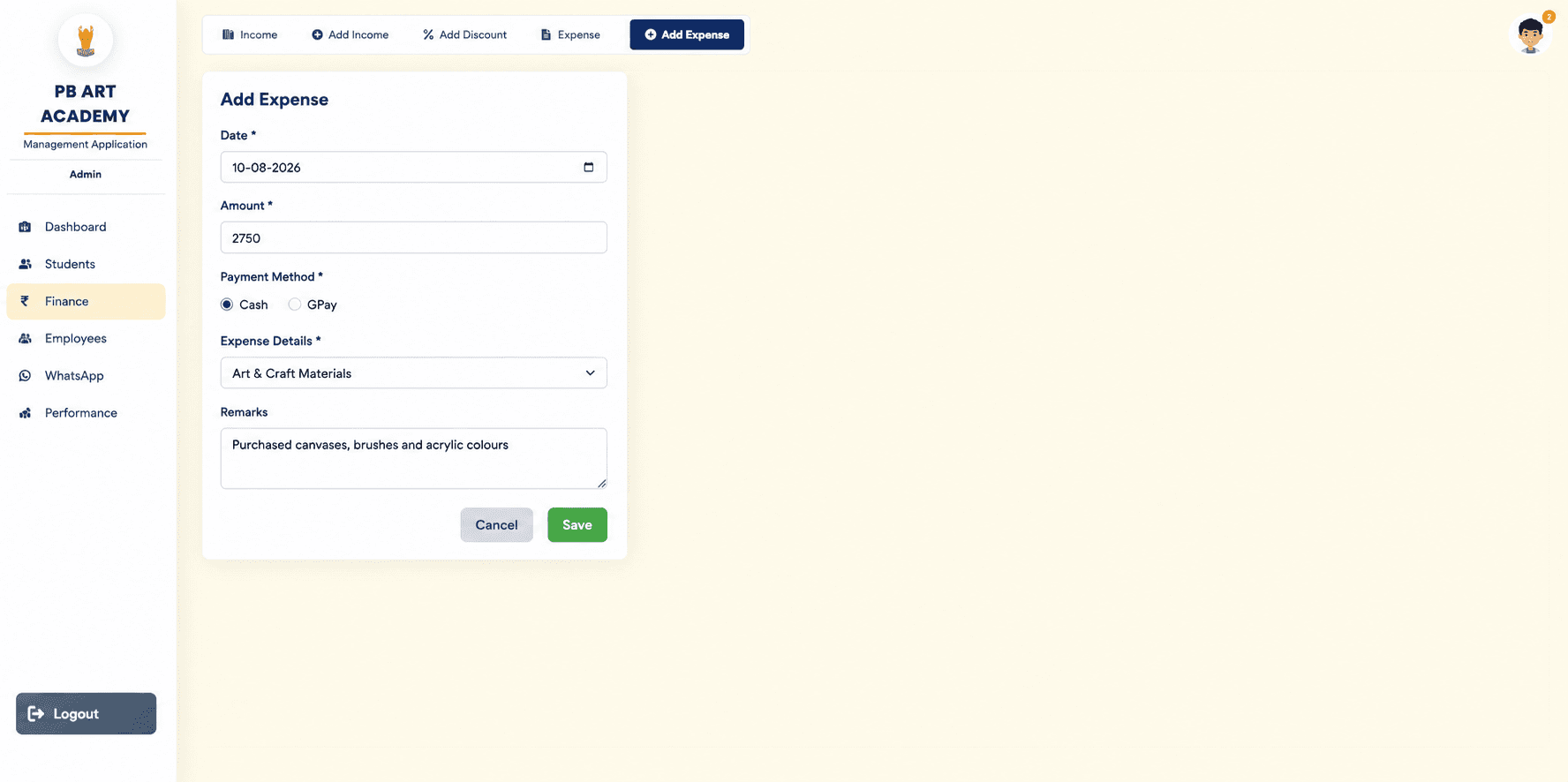
Fee collection
Cash, GPay and card payments logged against a student and a fees month, with automatic due calculation.
Discounts
Per-student discounts recorded with a remark, feeding directly into the same ledger as regular fees.
Ledger
One summary view of opening balance, income, expenses and closing balance — split by cash and account.
Expense tracking
Every expense categorised (rent, utilities, salaries, materials, maintenance, marketing) with payment method.
Cash flow
Cash vs account income tracked separately so the Owner always knows exactly what's in hand.
Reports
Date-range filtering across income and expenses, with running totals and per-transaction edit access.
Staff, attendance and payroll, together.
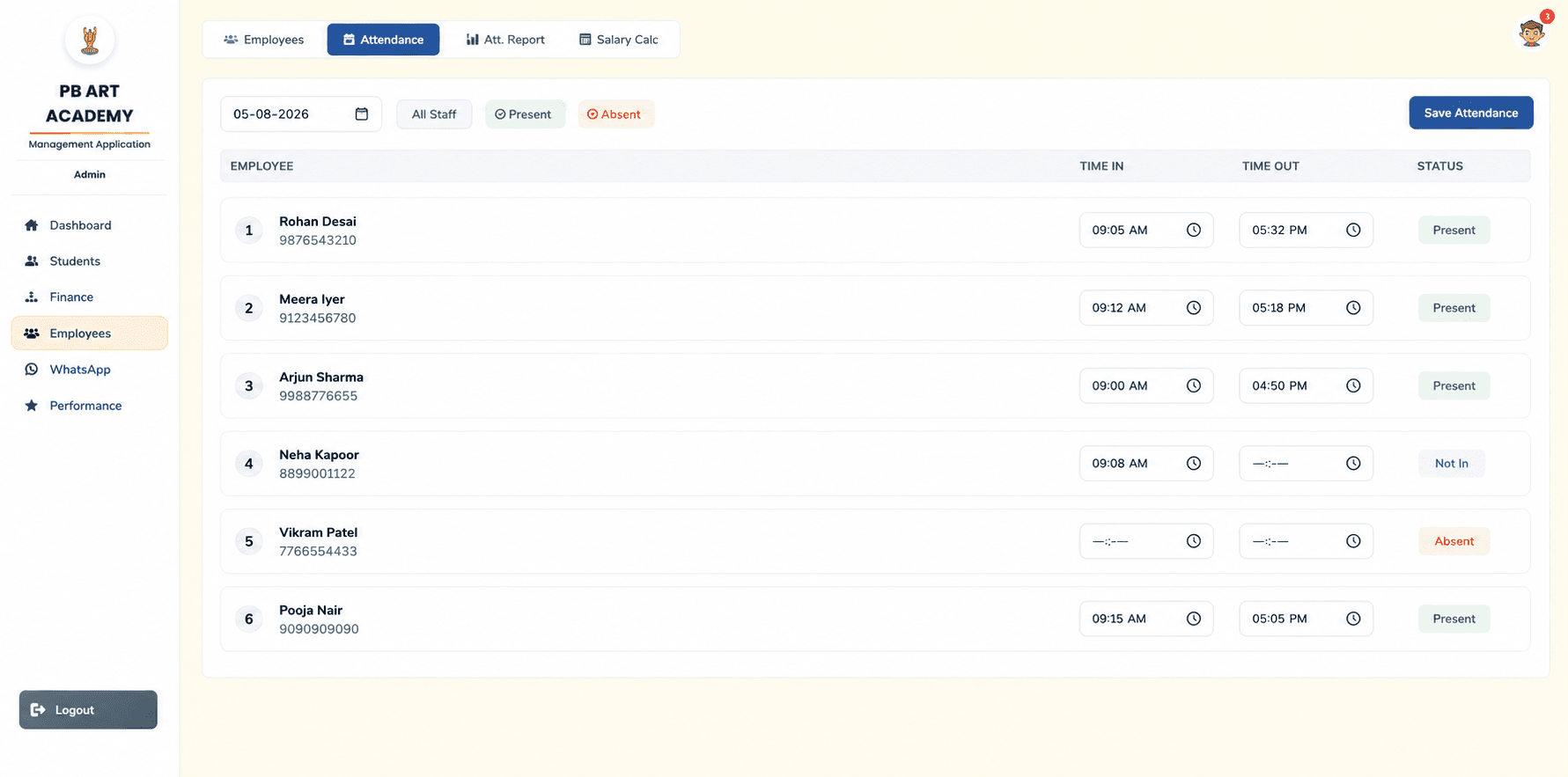
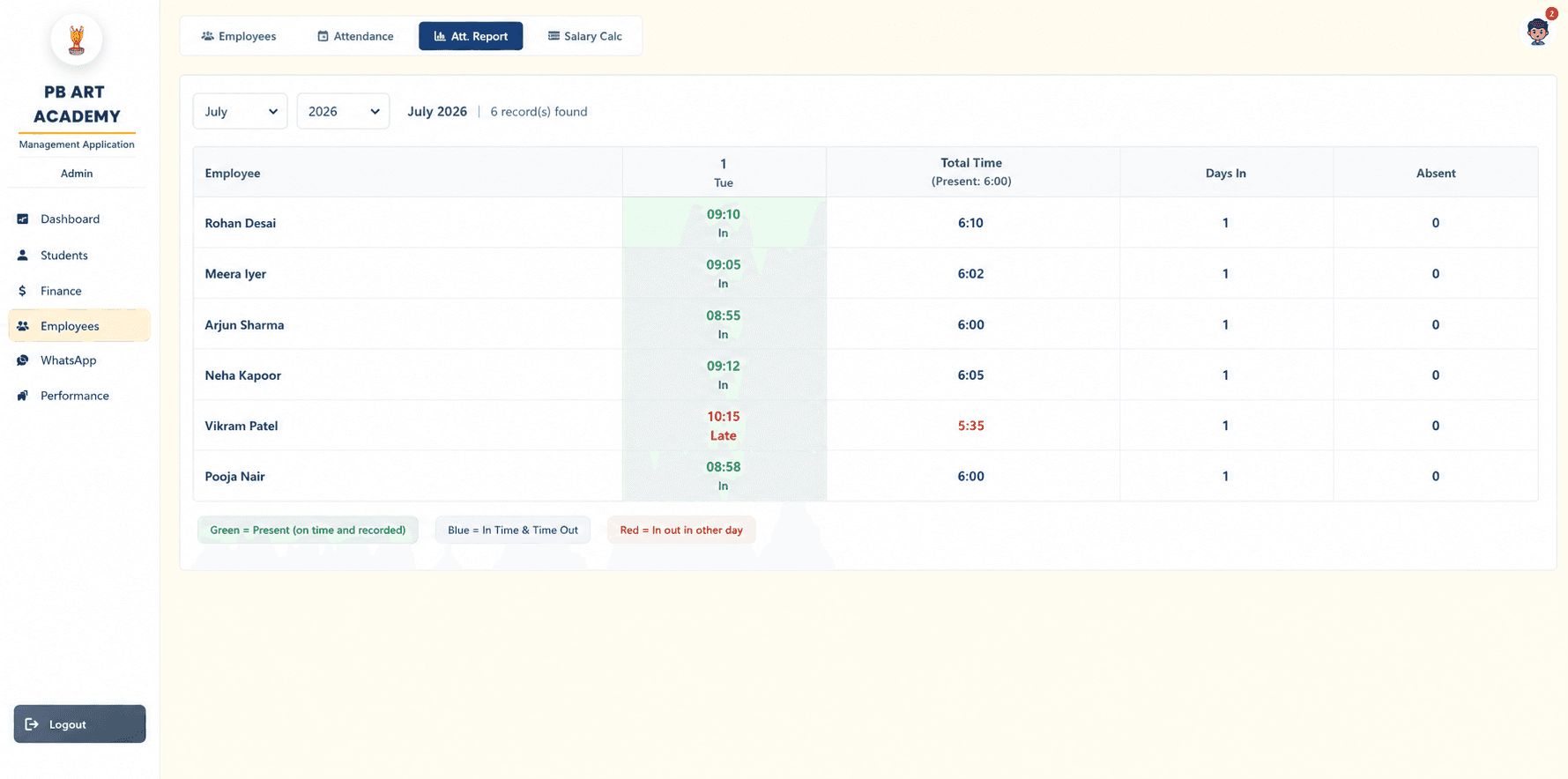
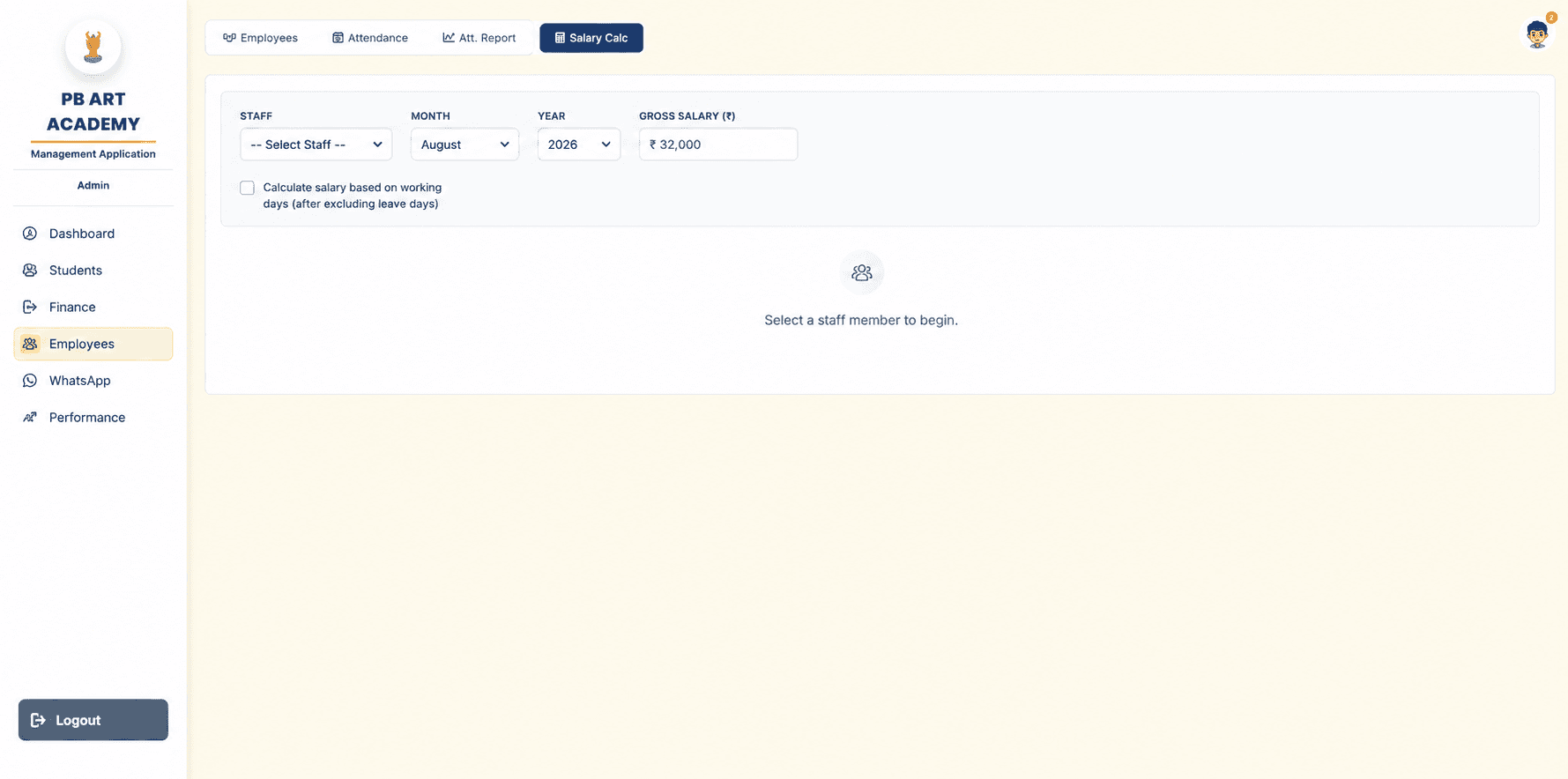
Six instructors, one system — attendance, salary calculation and assignments all live under Employees.
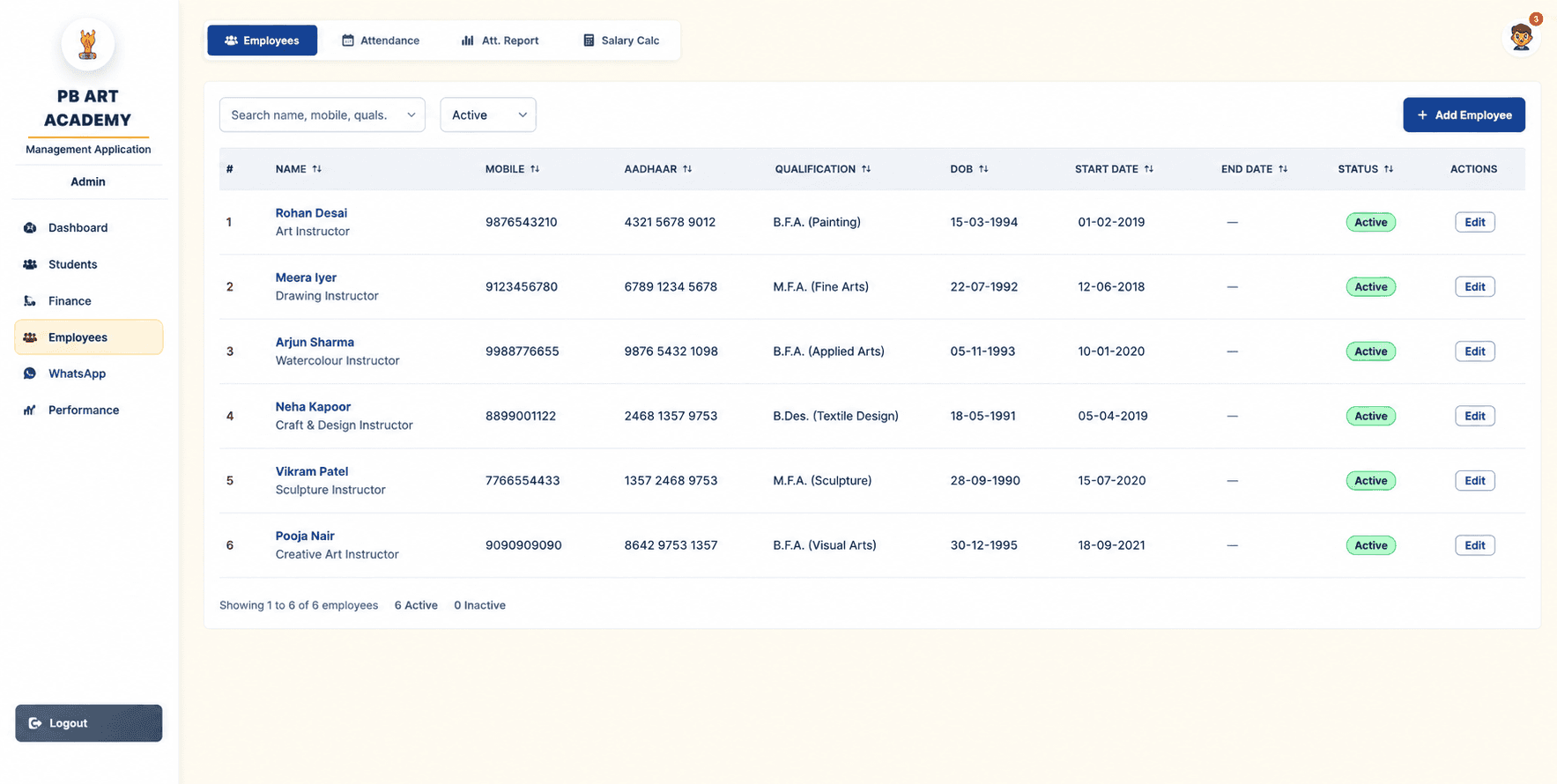
Staff management
Instructor records with qualification, ID, join/end date and active status — six instructors on record.
Attendance
Daily time-in/time-out per instructor, feeding directly into the monthly attendance report.
Payroll
A salary calculator that can pro-rate gross salary against actual working days after excluding leave.
Assignments
Instructors are linked to their students throughout the Performance module for accountability.
Reporting
Monthly attendance reports with on-time/late/missing colour coding for quick review.
Reminders that send themselves — almost.
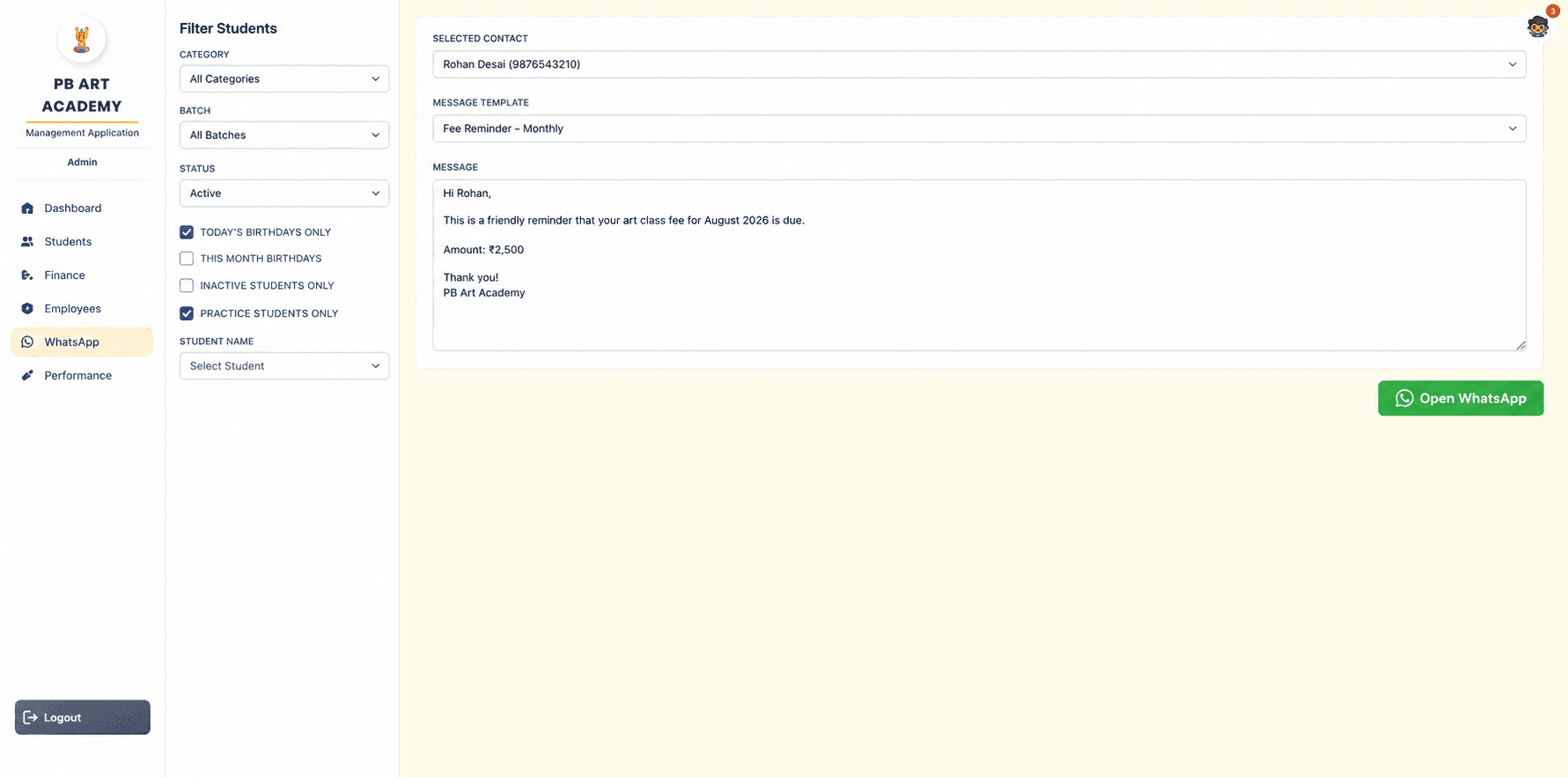
Filter the right audience, pick a template, and the message arrives pre-composed in WhatsApp.
Birthday wishes
A birthday bell in the sidebar detects today's birthdays on load and links straight into the WhatsApp flow.
Fee reminders
A pre-built "Fee Reminder – Monthly" template pulls in the student's name and amount due automatically.
Custom templates
Staff filter by category, batch, status or specific student, then pick a message template to send.
Direct communication
One click opens WhatsApp with the composed message pre-filled — no copy-pasting phone numbers.
Every art, every student, tracked to completion.
Tracker, Scoring, Leaderboard and Syllabus share one tab group — a single source of truth for student progress.
Student progress
A multi-select art picker records each art a student is working on, with a Not Started / In Progress / Completed status.
Art tracking
In-progress arts show inline as chips (e.g. "Portrait Sketching · Shading") against each student's row.
Scoring
Completed arts are marked with a score, which rolls up into an average per student and per instructor.
Leaderboards
Student and staff rankings with sortable columns, category/batch/staff filters and a custom date range.
Syllabus reference
The full art curriculum by category and level, used as the reference set for both tracker and scoring.
Progress visualisation
A dual-handle range slider on the In-Progress Tracker filters arts by min/max days outstanding.
No framework magic — just a stack built to be maintained.
A React 19 SPA talking to a procedural PHP REST API over MySQL, deployed on Hostinger shared hosting.
React
v19.1.1Core UI library — functional components with hooks throughout, no class components.
React Router DOM
v7.8.2Client-side routing with protected route wrappers per role.
Recharts
v3.2.1Bar, line and composed charts across the Analytics module.
React Icons
v5.5.0FA and MD icon sets used across all modules for nav, actions and badges.
React Select
v5.10.2The multi-select art picker in the Tracker tab, with custom option rendering.
React Datepicker
v8.7.0Used in finance flows for date and date-range inputs.
date-fns
v4.1.0Date manipulation utilities for formatting and calculation across modules.
CalendarRangePicker
Custom · in-houseA day-grid popup calendar built from scratch — two-click range selection with week/month presets.
apiFetch
Custom · in-houseA thin fetch wrapper that injects X-Username and X-Role headers automatically.
Create React App
react-scripts 5.0.1Build toolchain, outputting hashed static bundles deployed to /App/.
PHP
Hostinger sharedProcedural PHP — each endpoint file routes its own requests via switch($_GET['action']).
PDO / MySQL
utf8mb4 · ISTPersistent PDO connection with ERRMODE_EXCEPTION; timezone forced to +05:30 on connect.
PHP Sessions
+ user_logs tableAuth tracked in both the PHP session and the database via a 30-second heartbeat.
Audit Logging
audit_logs tableA logAudit() helper called after every write — user, role, action, entity, IP and timestamp.
Environment Config
.env.main fileDB credentials loaded via a custom loadEnv() parser, with no external libraries.
CORS
PermissiveCustom X-Username and X-Role headers whitelisted for role-aware, cross-origin API calls.
The details that make it feel finished.
Straight from the build — every feature below shipped, not planned.
Role-Based Access
Four roles — Owner, Admin, Manager, Instructor — with route guards and server-side validation on every request.
Analytics
KPI tiles, trend charts and drill-down analytics, click-through from any summary chart to the source record.
Attendance
Daily marking with date-range reports and summary stats for both students and staff.
Finance
Fee collection, discounts, expenses and a live ledger with payment-date filtering.
Birthday and fee-reminder templates triggered directly from student and staff records.
Leaderboard
Live client-side filtering by category, batch and staff, with sortable columns and a custom date range.
Performance
Art-by-art tracking with a dual-handle slider to filter the In-Progress Tracker by days outstanding.
Audit Logs
A complete trail of every insert, update and delete — who, what, when and from where.
Reports
Attendance and financial reports with date-range filters and running totals.
Calendar
A custom-built CalendarRangePicker — day-grid popup with range highlighting and week/month presets.
Tracker
A multi-select art picker recording per-student progress against the full syllabus.
Photo Capture
Camera-based student photo upload attached directly to the registration record.
Responsive Design
Every table degrades to a mobile-friendly card layout at the 640px breakpoint.
What changed, day to day.
No fabricated before/after percentages here — just the operational shifts the platform actually made.
Digital attendance
Paper registers replaced with one-tap daily attendance and instant date-range reports.
Automated finance
Fee collection, discounts and expenses now flow into a single live ledger instead of separate notebooks.
Centralized records
Every student, guardian, batch and enrolment history lives in one searchable system of record.
Better visibility
The Owner sees enrolment, attendance, fees and staff performance on one dashboard, in real time.
Reduced paperwork
Registration, attendance and fee receipts are now digital, end to end.
Better decision-making
Drill-down analytics turn raw activity into trends the Owner can act on, not just numbers to file away.
Faster registration
A single structured form — with photo capture — replaces multi-step paper admission.
Accountability
Role-based access and a full audit trail mean every change is attributable and traceable.
A closer look.
A highlight reel across the platform — each screen appears in full context earlier in this case study.
From paper registers to a real-time system of record.
PB Art Academy now runs on a single platform instead of five disconnected habits — attendance is digital, fees reconcile themselves into a live ledger, and every instructor sees exactly the students and syllabus items assigned to them.
Because the platform was built module by module against the academy's real workflow — not adapted from a generic template — it fits the way the academy actually operates today, and has room to grow: new batches, categories and staff slot into the same structure without re-architecture.
For the Owner, the biggest shift isn't any single feature — it's that the whole business (students, money and performance) is now visible from one dashboard, in real time, instead of reconstructed by hand at the end of every month.